

%22%2F%3E%3Cuse%20href%3D%22%23E%22%20fill%3D%22url(%23B)%22%2F%3E%3Cuse%20href%3D%22%23E%22%20x%3D%2291.28%22%20fill%3D%22url(%23C)%22%2F%3E%3Cpath%20d%3D%22M89.15%2C10.94v81.61H7.54c0-45.07%2C36.54-81.61%2C81.61-81.61h0Z%22%20fill%3D%22url(%23D)%22%2F%3E%3C%2Fsvg%3E)



There's this moment that happens in offices everywhere, probably multiple times a day. Someone on your team is working with an AI document processing system, and they find themselves typing out an explanation they've already given three times this week. "As I mentioned before, when we process invoices from our East Coast vendors, we need to flag anything over $50,000 for additional approval..." They pause, delete it, retype it slightly differently, and wonder why they're explaining the same thing over and over to a system that's supposed to make their life easier.
If you've felt this frustration, you're not alone. And more importantly, this isn't just a minor annoyance. It's costing your organization real money, real time, and real employee satisfaction.
The $340,000 Question Nobody's Asking
Here's what most organizations don't realize. When you add up all those repeated explanations, all those moments where someone has to re-establish context that should already exist, and all the time spent getting an AI system back up to speed on requirements it should remember, you're looking at an average annual productivity drain of $340,000 for a mid-sized team of 50 people processing documents regularly.
That number comes from tracking actual workflows across different industries. A financial services team processing loan applications. A healthcare provider managing patient intake forms. A manufacturing company handling supplier documentation. The pattern shows up everywhere, and it's remarkably consistent.
Break it down per person and you're looking at roughly 2.5 hours per week spent re-explaining context. That might not sound like much until you multiply it across your entire team and realize that's nearly 6,500 hours annually that could be spent on actual work instead of re-teaching an AI system things it should already know.
But the cost goes beyond just time. There's the cognitive burden of context-switching. Every time someone has to stop their actual work to re-explain requirements to an AI system, they're pulling themselves out of productive flow. Research on cognitive task switching shows it takes an average of 23 minutes to fully regain focus after an interruption. Even if the explanation itself only takes 5 minutes, the real productivity hit is much larger.
What Your Team Remembers (That Your AI Doesn't)
Think about how your best team members work with documents. Someone who's been processing insurance claims for three years doesn't just look at each claim in isolation. They remember that this particular client always submits forms with handwritten notes in the margins that contain critical information. They know that claims from a specific region tend to have date formatting that looks wrong but is actually correct. They've learned that when a certain type of document comes through on a Friday afternoon, it usually means there's a rush situation that needs special handling.
This contextual knowledge isn't written down anywhere. It's built up through experience, through patterns recognized over time, through understanding the relationships between different types of information.
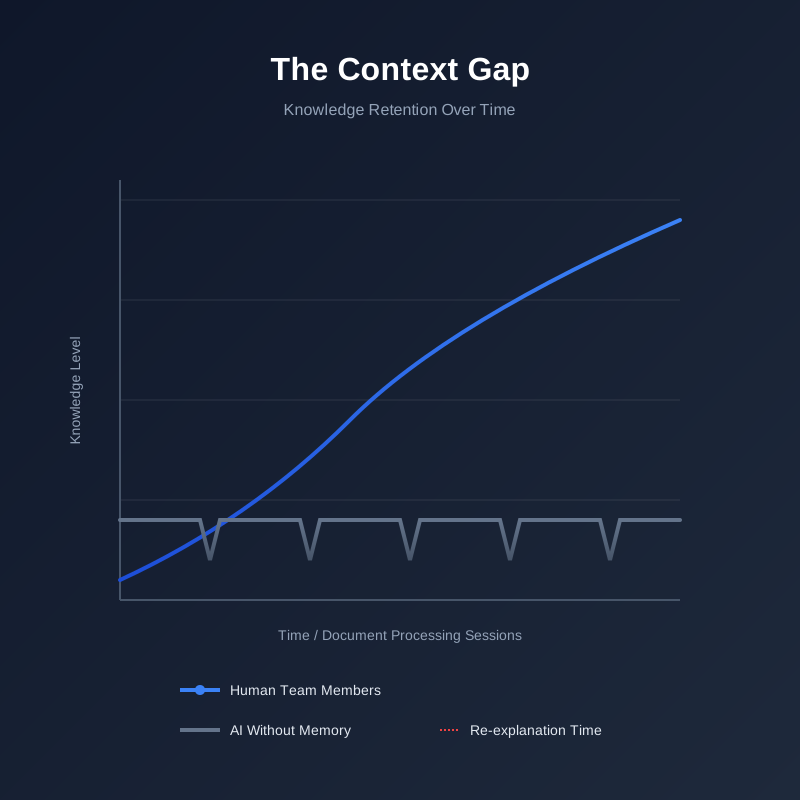
Now look at how most AI document processing systems work. Each document gets treated as a fresh start. Each processing request begins from zero. The system has no memory of the preferences you set yesterday, the exceptions you flagged last week, or the patterns you've been refining for months.
You end up with a bizarre situation where the human members of your team are constantly translating their accumulated knowledge into instructions the AI can understand, doing this translation over and over, because the AI can't hold onto that knowledge between sessions.
The Daily Friction Points
Let's get specific about where this memory gap creates real problems. These are the situations teams deal with every single day.
The Vendor Exception Problem: Your company works with hundreds of vendors, but about a dozen of them have quirks in how they format their invoices. One vendor always puts the PO number in the notes field instead of the designated PO field. Another uses a non-standard date format that looks like an error but isn't. A third includes shipping costs as a separate line item that needs to be added to the total, not processed separately.
Your team members know all this. They've learned it through experience. But your AI system? It needs to be told. Every. Single. Time. Or you need to build specific rules for each vendor, which works until a vendor slightly changes their format and breaks your rule. Then someone has to notice it broke, understand why, and update the rule. More time spent maintaining the system instead of using it.
The Compliance Context Challenge: Different types of documents have different compliance requirements, and these requirements can change based on various factors. A loan application from a first-time borrower needs different documentation than one from a repeat customer. A medical claim for an emergency procedure has different urgency and validation rules than a scheduled procedure.
Your team understands these nuances. They've been trained on them, they apply them constantly, and they get better at recognizing edge cases over time. But if your AI system can't remember the compliance context from previous similar documents, your team ends up playing compliance instructor every time they process documents, explaining requirements the system should already understand.
The Format Evolution Headache: Documents don't stay static. Vendors update their invoice templates. 4 get revised. Internal document formats change as your business processes evolve. Your team adapts to these changes naturally, noting when something looks different and adjusting their expectations accordingly.
But most AI systems treat format changes as errors rather than evolutions. Someone has to manually update the system's understanding of what the new format looks like, often by processing several examples and correcting the system's mistakes until it "learns" the new format. Except it doesn't really learn because if that format shows up again in six months after a period of not seeing it, the system might have forgotten and need to relearn it all over again.
The Repetition Fatigue Nobody Talks About
There's something particularly draining about having to explain the same thing multiple times to a system that's supposed to be intelligent. It creates a specific kind of frustration that's different from other workplace annoyances.
When you're training a new team member, there's a clear progression. You explain something once, they ask questions, you clarify, and then they've got it. The next time a similar situation comes up, they remember or they at least remember enough to know where to look for the answer. There's growth happening, competence building, the satisfaction of seeing someone become more capable.
With an AI system that can't remember context, there's no progression. It's Groundhog Day for your entire team. You explain the same vendor exception on Monday, Tuesday, Wednesday, and by Friday you're questioning why you're using an AI system at all if you have to do this much manual guidance.
This repetition fatigue shows up in subtle ways. Team members start taking shortcuts, skipping explanations because they're tired of typing them out, which leads to processing errors. Or they start avoiding certain types of documents because they know it will mean another round of re-explaining context. The system that was supposed to make work easier starts making it more frustrating.
What Smart Caching Actually Means
The solution isn't about building a system with perfect memory that never forgets anything. That would create its own problems (like remembering outdated preferences or holding onto exceptions that are no longer relevant). What teams need is smart caching, selective memory that knows what to retain and for how long.
Think about how your brain works with recently used information. If you're working on a project intensively for a week, all the relevant details stay readily accessible. Take a month off from that project and come back to it, and you need a few minutes to reload that context into your working memory. But you don't have to relearn everything from scratch because the foundational knowledge is still there in deeper storage.
Smart caching for document processing works on similar principles. The system maintains active memory of frequently used context while letting rarely accessed information fade into the background. It recognizes patterns in how your team works and proactively caches the information they're likely to need.
For example, if your team processes invoices from a particular vendor every week, the system keeps that vendor's formatting quirks and processing preferences in active memory. If a vendor only submits invoices quarterly, their specific requirements get cached but with a lower priority, recalled when needed but not taking up constant active memory space.
The key is that your team shouldn't have to think about what gets cached and what doesn't. The system should learn from usage patterns and handle memory management intelligently in the background.
The Three Types of Context That Matter Most
Not all context is equally valuable to cache. After analyzing workflows across different industries, three types of context show up as consistently important and worth the effort to maintain.
Processing Preferences: These are the specific ways your team likes to handle certain situations. Maybe you want all documents from a particular department to automatically route to a specific reviewer. Maybe you've established that certain types of errors should trigger immediate alerts while others just get flagged for later review. Maybe there's a preference for how extracted data gets formatted before it's sent to your ERP system.
These preferences accumulate over time as your team refines their workflows. They represent real decisions made based on real experience with what works best for your organization. Losing these preferences means losing that accumulated wisdom and having to rebuild it from scratch.
Exception Patterns: Every document processing system encounters exceptions, documents that don't quite fit the standard pattern. How your team handles these exceptions evolves over time. You might start by manually reviewing every exception, then realize that certain types of exceptions follow their own patterns and can be handled automatically, while others truly do need human judgment.
The system should remember these exception-handling patterns. When a document comes in that matches a previously resolved exception type, the system should recall how it was handled before and either apply the same solution automatically or at least prompt with the previous approach as a starting point.
Relationship Context: Documents don't exist in isolation. An invoice relates to a purchase order. A loan application connects to previous applications from the same customer. A medical claim links to a patient's treatment history. Understanding these relationships is critical for accurate processing, and much of this relationship knowledge exists in your team's collective memory rather than in formal documentation.
Smart caching maintains awareness of these relationships. When processing a document, the system recalls relevant context from related documents it has processed before. This might mean remembering that a particular customer always submits supporting documentation separately, so the system should wait before flagging incomplete submissions. Or it might mean recognizing that certain types of forms typically arrive in batches that need to be processed together rather than individually.
How Memory Actually Gets Used in Real Workflows
Understanding what to cache is only half the picture. The other half is knowing how and when to surface that cached information so it's actually useful rather than just adding clutter.
The best implementations use what you might call "contextual recall." The system doesn't dump all potentially relevant cached information every time you process a document. Instead, it watches for triggers that indicate specific cached context might be relevant, then surfaces just that information at the moment it's needed.
For example, when you start processing an invoice from a vendor with known formatting quirks, the system recognizes that vendor and automatically applies the cached handling preferences without you needing to request them. The document gets processed correctly on the first pass, and you only get notified if something doesn't match the established pattern (which might indicate a legitimate change that needs your attention).
Or when reviewing an exception, the system recognizes similarity to previous exceptions and shows you how those were resolved, along with any notes your team made about their decision-making process. You're not starting from scratch trying to figure out what to do. You have the benefit of your team's previous experience with similar situations.
This contextual recall happens automatically in the background, making the AI system feel less like a tool you have to constantly instruct and more like a knowledgeable colleague who remembers relevant details without you having to ask.

The Configuration Challenge Most Teams Get Wrong
When organizations first learn about smart caching capabilities, they often make the same mistake. They try to configure everything upfront. They sit down and try to enumerate every vendor quirk, every processing preference, every exception pattern they can think of. They spend weeks building out comprehensive configuration settings before processing their first document with the new system.
This approach fails for several reasons. First, it's exhausting and time-consuming. Second, people aren't great at articulating tacit knowledge. The things experienced team members "just know" are hard to translate into explicit rules. Third, requirements change, and maintaining a massive upfront configuration becomes its own burden.
A better approach treats smart caching as something that builds up organically through actual use. Start with minimal configuration, just the essentials. Then let the system learn from real processing activities. When someone makes an adjustment or explains context while processing a document, the system should ask "should I remember this for next time?" and learn from the response.
This organic approach means the cache gets populated with information that's actually useful, proven through real use, rather than theoretical scenarios someone thought might be relevant. It also distributes the configuration work over time, making it manageable rather than overwhelming.
The system should also be smart about validating cached information. If a cached preference hasn't been used in six months, the system might prompt to verify it's still relevant rather than just deleting it. If a vendor's formatting suddenly doesn't match the cached pattern, flag it as potentially changed rather than assuming the document is wrong.
Measuring the Impact of Better Memory
So how do you know if smart caching is actually helping? The most obvious metric is time saved on repetitive explanations, but that's not always easy to measure directly. Better indicators often come from looking at related effects.
Watch for a reduction in processing errors, especially the kinds of errors that happen when someone takes a shortcut because they're tired of re-explaining context. When your team doesn't have to constantly re-instruct the system, they're less likely to skip steps or make assumptions that lead to mistakes.
Track how many documents get processed correctly on the first pass without requiring manual intervention. As the system builds up cached context, more documents should sail through processing without needing human correction. This is where you see the real productivity gain, more documents processed in less time with fewer errors.
Pay attention to team sentiment. Are people less frustrated with the AI system? Do they talk about it as a helpful tool rather than another burden? This qualitative feedback often surfaces before you see the quantitative metrics, and it matters because frustrated employees are less productive even when the metrics look okay on paper.
Look at onboarding time for new team members. When the system maintains institutional knowledge in its cache, new people don't have to learn (or relearn) all the quirks and exceptions from scratch. They can benefit from the accumulated wisdom of more experienced team members, encoded in how the system processes documents.
The Balance Between Memory and Flexibility
One concern that comes up frequently is that caching context might make systems too rigid, unable to adapt when requirements change. This is a valid concern, but it's really about implementing smart caching poorly rather than an inherent problem with the approach.
Good caching implementations include mechanisms for evolution. The system should notice when cached patterns stop matching reality and surface this as a potential change that needs review rather than either blindly following outdated patterns or discarding them entirely.
Think of it like how experienced team members handle changes. When a vendor changes their invoice format, an experienced processor doesn't panic or assume the invoice is wrong. They notice the change, verify it's legitimate, update their mental model of how that vendor's invoices work, and move forward. The system should do the same, notice pattern breaks, check if they represent real changes, and update cached context accordingly.
This means cached information shouldn't be treated as permanent truth but rather as "this is how things have worked up to now, but we're watching for changes." The system maintains context while remaining alert for evolution in how that context should be applied.
Common Implementation Mistakes to Avoid
Most teams make predictable mistakes when implementing smart caching. Knowing these pitfalls ahead of time helps you avoid them.
Over-caching Everything: Just because something could be cached doesn't mean it should be. Some information is genuinely one-off and caching it just adds noise. The goal is selective memory, not comprehensive recording of every processing decision ever made.
Under-explaining Initial Context: Teams sometimes assume the system will figure out patterns with minimal input. While good systems can learn from usage, they need enough initial context to understand what they're looking at. If you skip explaining important context because you expect the system to infer it, you end up with a cache built on assumptions rather than understanding.
Forgetting to Prune: Cached context needs maintenance. Patterns that were relevant six months ago might not be relevant now. Vendor preferences change. Team members leave and new ones join with different approaches. The cache needs regular review to remove outdated information and make room for new patterns.
Ignoring Team Feedback: The people actually using the system daily are the best source of information about what context matters and what's just noise. If multiple team members keep re-explaining the same thing despite it supposedly being cached, that's valuable feedback that something isn't working right.
Treating All Context Equally: Some cached information is critical for accuracy (like compliance requirements) while other information is about convenience (like preferred formatting). The system needs to understand these distinctions and apply appropriate confidence levels to different types of cached context.
What This Looks Like in Practice
Let's walk through what smart caching feels like in a real workflow. Imagine you're processing supplier invoices for a manufacturing company.
You open up an invoice from one of your regular suppliers. The system immediately recognizes the supplier from the logo and applies cached processing rules automatically. It knows this supplier always includes packaging costs as a separate line that should be added to materials costs, not treated as a separate expense category. It knows their invoice numbers follow a specific format that looks non-standard but is correct for them. It knows they typically send invoices on the 15th of each month for the previous month's deliveries.
The system extracts all the data, applies the correct categorization rules, and prepares the invoice for approval. You glance at it, see everything looks good, and approve it. Total time: maybe 30 seconds, most of that spent waiting for the document to load.
Now an invoice arrives from a new supplier you've never worked with before. The system processes it but flags a few uncertainties. The invoice format is unusual, with line items organized differently than your typical suppliers. You review it, make corrections, and as you do, the system asks if these corrections represent preferences it should remember for future invoices from this supplier.
You confirm yes, and add a note that this supplier tends to send revised invoices if there are any quantity adjustments, so the system should watch for that pattern. Next month when an invoice from this supplier arrives, the system applies your previous corrections automatically and successfully catches a revised invoice because it was watching for the pattern you mentioned.
A few months later, your regular supplier changes their invoice template. The system notices the change, flags it as potentially significant rather than just processing errors, and asks you to verify. You confirm the new format, the system updates its cached understanding, and subsequent invoices process smoothly with the new template.
This is what smart caching feels like when it's working well. The system gets better at handling your specific documents and workflows over time, reducing the burden on your team rather than increasing it.
The ROI Reality Check
Let's return to that $340,000 annual productivity drain we mentioned at the beginning. What kind of ROI can you expect from implementing smart caching?
The math is straightforward but the timeline matters. In the first month, you probably won't see dramatic savings because the cache is still building up. The system is learning, which means your team is still explaining context, just now it's being captured rather than lost.
By month three, you should start seeing noticeable improvements. Documents from regular vendors process more smoothly. Common exceptions get handled more consistently. Team members spend less time on repetitive explanations.
By month six, the accumulated cache starts delivering serious value. Processing time per document drops. Error rates decrease. Your team handles more volume without adding headcount.
The savings accumulate over time as the cache becomes more comprehensive and more accurate. That 2.5 hours per week per person spent on repetitive explanations starts dropping toward 1 hour, then 30 minutes. Scale that across your team and you're talking about recovered productivity that can be redirected toward higher-value work.
But don't just look at time saved. Consider error reduction, the cost of processing errors in document workflows. Consider improved employee satisfaction, people are less frustrated when they're not constantly re-explaining things. Consider scalability, a team with good smart caching can handle increased document volume without proportional increases in staffing.
Building Toward Genuine Intelligence
Smart caching is really a step toward something bigger, AI systems that genuinely learn and improve from interaction rather than remaining static tools that need constant direction.
When your document processing system remembers context, adapts to your workflows, and gets better at handling your specific documents over time, it starts feeling less like software you operate and more like a team member who's learning the job.
This matters because it changes the relationship between humans and AI in the workflow. Instead of humans constantly teaching the AI, you get genuine collaboration where both the humans and the AI contribute their strengths. Humans provide judgment, handle novel situations, and make decisions that require real understanding. The AI provides consistency, handles volume, and remembers details that humans might overlook or forget.
The productivity gains are real and measurable, but the bigger impact might be cultural. Teams that work with AI systems that actually remember and learn tend to be more receptive to automation, more willing to trust the technology, and more effective at leveraging it for real business value.
Getting Started Tomorrow
If this resonates with your experience, if you recognize your team in these patterns of repetitive explanation and context re-establishment, what should you do about it?
Start by tracking the repetition for one week. Have your team simply note (in a shared document or chat) each time they find themselves re-explaining context to your document processing system. Don't try to quantify it precisely, just capture the instances. You might be surprised by how often it happens.
Then prioritize. Look at which types of context get re-explained most frequently. That's where smart caching will deliver the fastest ROI because those are the patterns most worth automating.
Begin implementing caching for those high-frequency patterns. Don't try to cache everything at once. Pick three to five patterns that show up constantly and make sure those get properly captured and recalled.
Watch the results. Are those documents processing more smoothly? Is your team spending less time on those specific explanations? Use those early wins to inform the next round of caching implementation.
Remember that smart caching isn't a one-time setup project. It's an ongoing process of helping your AI system build up the kind of contextual knowledge that your experienced team members have developed over time. Done well, it transforms document processing from an exercise in constant instruction to genuine automated workflow where the AI actually earns its "intelligent" label.
Your team's knowledge and experience have real value. Smart caching makes sure that value gets captured, retained, and put to work rather than evaporating at the end of each processing session. That's the difference between AI that assists and AI that genuinely helps.