

%22%2F%3E%3Cuse%20href%3D%22%23E%22%20fill%3D%22url(%23B)%22%2F%3E%3Cuse%20href%3D%22%23E%22%20x%3D%2291.28%22%20fill%3D%22url(%23C)%22%2F%3E%3Cpath%20d%3D%22M89.15%2C10.94v81.61H7.54c0-45.07%2C36.54-81.61%2C81.61-81.61h0Z%22%20fill%3D%22url(%23D)%22%2F%3E%3C%2Fsvg%3E)



Your sales team closes a huge deal. The client wants invoices branded with their logo and custom payment terms. Simple request, right?
Except it requires a developer to modify the PDF generation template. And the dev team is heads-down on a product launch for the next three weeks. So your sales team waits. The client waits. The invoice sits in limbo because changing a template requires someone who speaks JavaScript.
This is the template hostage situation, and it's quietly strangling business agility in thousands of companies.
When Templates Become Prison Cells
Most document automation started with good intentions. A developer built a clean system that generates PDFs from data. Invoices flow automatically. Contracts populate with correct terms. Everything works great.
Until someone needs to change the layout. Or add a new data field. Or update branding guidelines. Or customize templates for different regions.
Suddenly, that automated system becomes a bottleneck. Business teams can see exactly what they need, they know their requirements better than anyone, but they can't touch the templates without opening a developer ticket. The very system built to create efficiency becomes the thing that blocks progress.
A mid-sized logistics company learned this the hard way. They built a custom PDF generation system for shipping documents. When they expanded into Canada, they needed bilingual templates. When a major customer requested custom branding, they needed variant templates. When regulations changed in Europe, they needed compliance updates.
Each change meant a developer ticket. Each ticket meant a two-week wait. Their business team could sketch out exactly what they needed in 10 minutes, but actually making it happen took weeks. They were hostages to their own automation.
The Hidden Cost of Developer Dependency
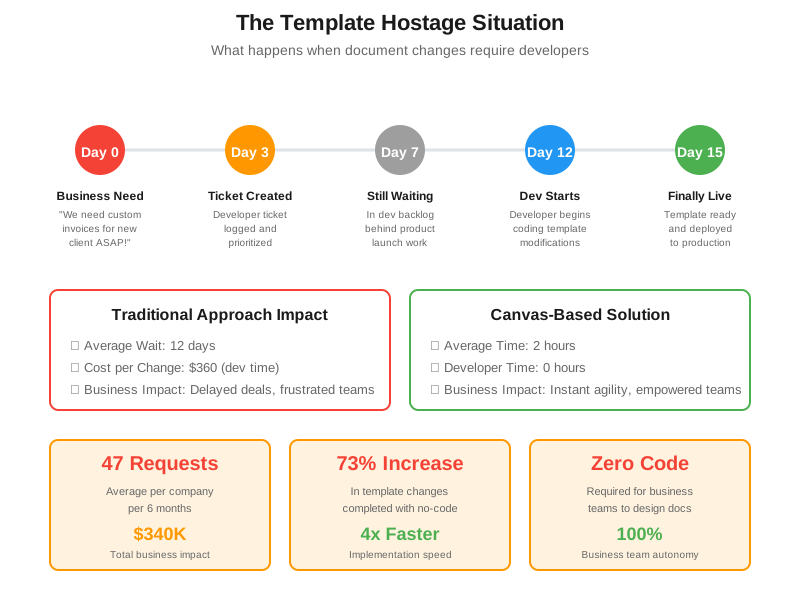
Research from Forrester shows that businesses wait an average of 12 days for IT to complete document template changes. That might not sound catastrophic until you calculate what it actually costs.
A financial services firm tracked their document template requests for six months. Marketing needed updated proposal templates when branding changed. Sales needed region-specific contract variations. Finance needed new compliance disclosures on statements. Operations needed modified shipping labels for new warehouse locations.
Total requests: 47 in six months. Average wait time: 11 days. Average developer time per request: 3 hours.
The math is brutal. If you assume a developer costs $120 per hour (fully loaded with benefits and overhead), that's $16,920 in direct developer costs. But the real damage is in the waiting. Sales deals delayed because contract templates weren't ready. Marketing campaigns postponed because proposal documents weren't updated. Customer onboarding slowed because welcome packets needed IT intervention.
They estimated the total business impact at $340,000 over six months. Not because their documents were broken, but because changing them required technical resources that had better things to do.
The "Just Learn to Code" Fallacy
Some organizations try to solve this by teaching business users to code. Operations managers take Python classes. Marketing coordinators learn template scripting languages. Sales directors attempt to understand PDF generation libraries.
This rarely ends well.
First, most business professionals don't want to become programmers. They want to create great documents that serve their customers. Making them learn coding syntax to change a font size or add a logo is like requiring pilots to rebuild engines before flying.
Second, even when business users pick up basic coding, they rarely understand the full system architecture. A small change that seems simple can break other parts of the generation pipeline. Now you have untrained people making changes that create bugs, which requires developers to debug, which defeats the entire purpose.
Third, code-based templates are fragile. One misplaced bracket, one typo in a variable name, one wrong data type, and the entire document generation fails. Business users shouldn't need to think about whether something is a string or an integer when they're just trying to update payment terms on an invoice.
What Canvas-Based Design Actually Means
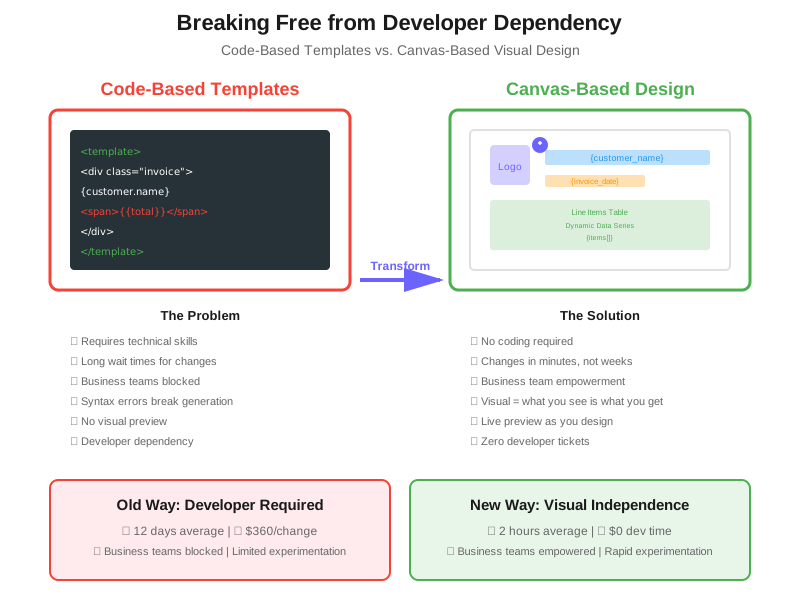
The revolution happening right now is moving document design from code to canvas. Instead of writing template syntax, you design visually like you would in Canva or Figma. Drag elements where you want them. See exactly what the final document will look like as you build it. Connect data fields with simple clicks, not complex variable mappings.
This isn't dumbing down document design, it's making it accessible to the people who actually understand document requirements.
When an operations manager needs to add a new field to a shipping label, they shouldn't need to understand how the PDF rendering engine works. They should see a canvas, drag a text field to where it belongs, connect it to the right data source, and preview the result instantly. If it looks right, it is right.
The same logic applies to complex documents like contracts, invoices, reports, and certificates. Design complexity shouldn't require technical complexity. A beautifully formatted, data-rich document can come from visual tools just as easily as code-based templates, and often more reliably because what you see is actually what you get.
The Data Connection That Makes It Work
Visual design is only half the story. The real power comes when that visual canvas connects seamlessly to dynamic data sources.
Here's where most visual tools fall short. They let you create pretty templates, but connecting those templates to live business data still requires technical work. You end up with a beautiful design that can't actually generate documents from your customer database or ERP system.
The breakthrough happens when visual design and data integration become one unified experience. You design your invoice layout visually, then connect each field to your data with simple dropdowns. Customer name pulls from your CRM. Line items populate from your order management system. Totals calculate automatically based on data series you define.
No code, no scripts, no syntax errors. Just visual connections between design elements and data sources.
A healthcare provider used this approach to transform their patient statement generation. Previously, updating statement templates required their development team. The business team would sketch what they wanted, developers would code it, and there'd be several rounds of back-and-forth to get it right.
With canvas-based design, their operations team designed the templates directly. When regulations required new disclosure language, they added it themselves in 20 minutes. When they wanted to highlight payment plan options more prominently, they redesigned the layout and pushed it live the same day. When they needed Spanish-language versions, they duplicated the template and translated the fixed text while keeping all the data connections intact.
Developer involvement: zero. Time from idea to implementation: hours, not weeks.
The Template Library That Prevents Chaos
One concern with empowering business teams is consistency. When multiple people can create and modify templates, don't you risk having 47 different invoice designs, each slightly different, creating a branding nightmare?
Smart template management solves this. Organizations build master templates with locked elements (like logos, legal disclaimers, and brand colors) and flexible zones where business teams can customize. Marketing controls what can't change, operations controls what adapts to specific needs.
Regional teams can create variations without breaking brand guidelines. Product lines can have custom documents while maintaining company standards. Business units get autonomy without creating chaos.
Version control ensures you can roll back changes if something doesn't work. Permission systems let you define who can edit which templates. Preview and testing features let you validate documents before they hit customers.
The ROI That Actually Matters
Let's get concrete about the business impact. An insurance company moved from code-based to canvas-based document design. Here's what changed:
Before: Average time from document change request to implementation: 9 days. Developer hours per change: 2.5 hours. Changes completed per quarter: 18.
After: Average time from request to implementation: 2 hours. Developer hours per change: 0. Changes completed per quarter: 73.
The productivity gain wasn't just in speed. It was in what became possible. Marketing could test multiple proposal designs and see which converted better. Sales could customize contract templates for different industries without IT involvement. Customer service could update communication documents when customer feedback suggested improvements.
Business teams went from feeling stuck to feeling empowered. The documents they created became tools for experimentation and optimization, not static artifacts that required engineering sprints to modify.
What This Means for Your Team
If your organization treats document templates like sacred code that only developers can touch, you're living in the hostage situation. Every small change becomes a negotiation. Every update becomes a project. Every customization becomes a battle between business priorities and developer bandwidth.
Canvas-based document design breaks the dependency. It doesn't eliminate developers, it frees them to work on actual engineering challenges rather than moving text boxes in PDF templates. Business teams get the autonomy they need to serve customers effectively. Everyone wins.
The barrier between "I need this document to look like this" and "the document now looks like that" collapses. Design becomes immediate. Changes become instant. Testing becomes fast. Document quality improves because the people closest to customer needs control the templates.
This isn't about removing technical expertise from document generation. It's about putting technical expertise where it belongs (system architecture, data integration, security) and creative control where it belongs (with the business teams who understand what customers need to see).
The Question Nobody's Asking
Here's what organizations rarely consider: how much innovation are you missing because document changes are too expensive?
When updating a template requires developer time, you only make changes when absolutely necessary. You don't experiment with better layouts. You don't test customer preferences. You don't optimize for conversion or clarity. You stick with what works because change is too costly.
When document design becomes as easy as visual drag-and-drop, suddenly experimentation becomes cheap. You can test whether a different invoice layout reduces payment questions. You can see if highlighting certain terms in contracts leads to faster approvals. You can try regional variations and measure what works.
The cost of trying things drops to nearly zero. And when experimentation becomes free, innovation accelerates.