

%22%2F%3E%3Cuse%20href%3D%22%23E%22%20fill%3D%22url(%23B)%22%2F%3E%3Cuse%20href%3D%22%23E%22%20x%3D%2291.28%22%20fill%3D%22url(%23C)%22%2F%3E%3Cpath%20d%3D%22M89.15%2C10.94v81.61H7.54c0-45.07%2C36.54-81.61%2C81.61-81.61h0Z%22%20fill%3D%22url(%23D)%22%2F%3E%3C%2Fsvg%3E)



Here's the uncomfortable truth nobody tells you when you're implementing document automation: your AI is going to work beautifully on 95% of your documents. The other 5% will keep you up at night.
I'm not talking about catastrophic failures or system crashes. I'm talking about the handwritten note someone scrawled at the bottom of an invoice. The vendor who decided to completely redesign their document format last Tuesday. The PDF that's actually a screenshot of a screenshot that someone took on their phone. These are the documents that slip through your carefully trained models and land in what I call the exception queue, where they sit and multiply and slowly erode all the efficiency gains you just spent six months building.
Most conversations about document automation focus on getting to that magical 95% accuracy number. Everyone wants to talk about training models, fine-tuning parameters, and achieving those benchmark scores that look great in presentations. But you know what actually determines whether your automation project succeeds or fails in the real world? What you do with the 5% that doesn't fit. The companies that figure out exception handling are the ones that actually see ROI from their AI investments. The ones that don't end up with a backlog of problem documents, frustrated team members who've lost faith in the system, and executives wondering why they spent all that money on technology that still requires the same amount of manual work.
Let me be clear about something upfront. That 5% number isn't fixed. For some operations, it might be 3%. For others, especially in the early days of implementation, it could be 15% or even 20%. The percentage doesn't matter as much as having a real strategy for dealing with it. Because here's what happens when you don't: those exceptions pile up, someone has to manually process them under time pressure, errors get made, and suddenly your 95% automated process is causing more problems than your old manual system ever did.
The Reality of Document Exceptions
Think about what happens in a typical accounts payable department that's just implemented document automation. The system handles standard invoices from regular vendors without breaking a sweat. Dates get extracted, amounts get validated, purchase orders get matched. Everything flows smoothly into the ERP system. Then a vendor decides to add a new line item for fuel surcharges in a spot where the system expects to see shipping costs. Or a supplier gets acquired and starts using their parent company's invoice format. Or someone emails a photo of a crumpled receipt instead of a proper scan.
These aren't edge cases in the sense of being rare or unlikely. They're edge cases because they fall outside the patterns your system was trained to recognize. But they happen constantly. Every single day, real businesses deal with documents that don't match templates, data that appears in unexpected places, and formats that nobody anticipated when the system was being set up. The question isn't whether you'll encounter exceptions. The question is whether you're ready to handle them systematically when they show up.
What makes exceptions particularly challenging is that they're unpredictable by nature. You can't train a model to handle every possible variation because you don't know what all those variations will be. A customer might decide to handwrite additional information on a form. A partner company might change their document management system. A new regulation might require additional fields that your current process doesn't capture. The world keeps changing, and your document automation system needs to keep up.
The traditional approach to this problem is to just accept that some documents will need manual processing. Build a queue, assign people to watch it, and have them handle anything the system can't figure out. This works fine in theory, but it falls apart in practice for a pretty obvious reason. Nobody wants to spend their day cleaning up the mess that automation leaves behind. It's the worst kind of work because it's unpredictable, it requires constant context switching, and you're always dealing with the hardest cases. The easy stuff got automated. You're left with everything that's complicated, unclear, or just plain weird.
What you need instead is a structured approach that treats exception handling as a core competency, not an afterthought. That means understanding what types of exceptions you're dealing with, building processes that match each type, and creating feedback loops that help your system get better over time. It means accepting that perfect automation is impossible, but managed automation with intelligent exception handling can be incredibly powerful.
Understanding Your Exception Categories
Not all exceptions are created equal. Some can be handled automatically with a bit of human guidance. Some need special rules or processes. And some genuinely require full manual intervention. The key to effective exception management is learning to tell the difference quickly and route each document appropriately.
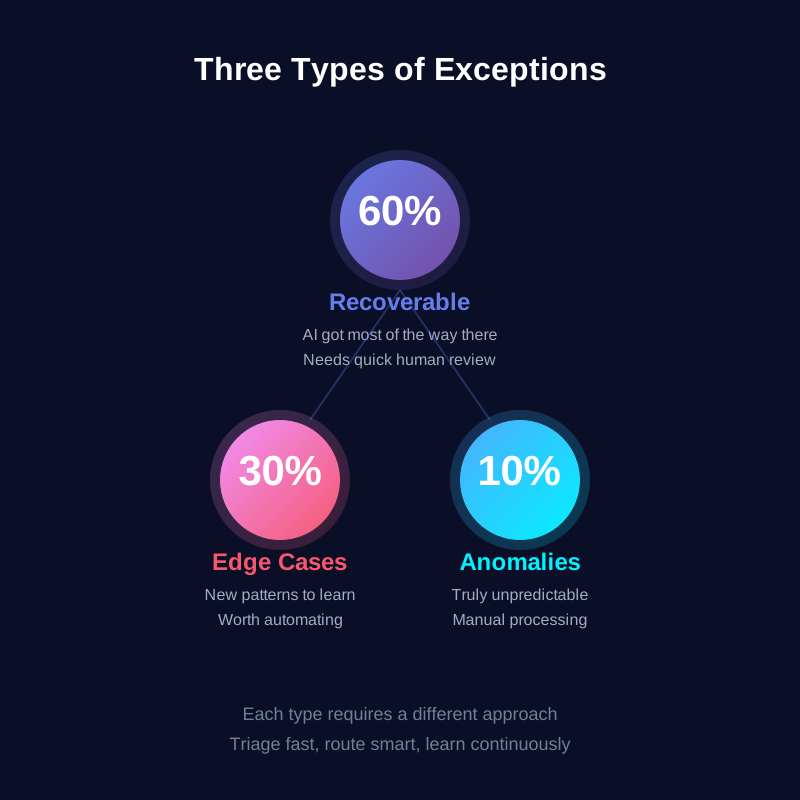
Let's start with recoverable exceptions. These are documents where your AI got most of the way there but needs a human to fill in the gaps or confirm its interpretation. Maybe the system extracted all the invoice data correctly but flagged the total amount as uncertain because the image quality was poor. Or it successfully identified a contract but couldn't determine the renewal date because the language was ambiguous. These documents don't need complete reprocessing. They need targeted human review of specific fields or decisions.
Recoverable exceptions are actually your biggest opportunity for improvement because they represent situations where your AI is almost there. With a good user interface and clear workflows, a person can review and approve these in seconds. The key is presenting the information in a way that makes the review task easy. Show the extracted data alongside the source document. Highlight the fields that need attention. Make it a one-click approval if everything looks right, or a quick correction if something's off. You're not asking people to process documents from scratch. You're asking them to quality check work that's already 90% done.
The second category is edge cases. These are documents that follow consistent patterns, just not the patterns your system currently knows. Think about what happens when you onboard a new vendor who structures their invoices differently than anyone else you work with. Or when you expand into a new region where documents follow local conventions your system hasn't seen before. Or when you acquire another company and suddenly inherit their entire document ecosystem.
Edge cases are predictable in the sense that once you've seen one, you'll probably see more just like it. They're the perfect candidates for creating specialized handling rules or even training new models. The first time you get an invoice from a new vendor, you might need to process it manually. But if you're getting 50 invoices a month from that vendor going forward, it's worth the effort to teach your system how to handle them. The key insight is recognizing when you're looking at a new pattern that's worth learning from, rather than a one-off anomaly.
Then there are genuine anomalies. These are the truly weird documents that don't follow any pattern and probably never will. Someone photographs a receipt with terrible lighting. A vendor sends a document that's half in one format and half in another. A customer submits a form where they've crossed out the printed questions and written their own. These documents need human processing, period. No amount of AI training is going to automate them because they're fundamentally unpredictable.
The mistake people make is treating all exceptions like anomalies. They throw everything that doesn't auto-process into the same queue and handle it all manually. But that means you're using your most expensive resource (human time) on problems that could be solved more efficiently. The smart approach is triaging exceptions into these categories quickly so you can apply the right level of effort to each one.
The Exception Queue Trap
Here's where things typically go wrong. You implement your document automation system. It works great on most documents. The exceptions go into a queue. Someone checks the queue when they have time. Some exceptions get processed quickly. Others sit there for days or weeks. Nobody's quite sure who's responsible for the queue. Different people handle exceptions in different ways. Nothing gets documented or learned from. And slowly but surely, the exception queue becomes this black hole that swallows time and creates anxiety.
I've seen exception queues with hundreds of documents sitting in them, some dating back months. I've seen operations where the person handling exceptions changes every week because nobody wants the job permanently. I've seen situations where exceptions get processed so inconsistently that downstream systems can't rely on the data. All of this happens because treating the exception queue as an afterthought rather than a critical system component.
The fundamental problem is that exception handling work is invisible until it becomes a crisis. When your automated processing is humming along, nobody notices the exceptions piling up in the background. But when a critical document sits unprocessed for three weeks because it landed in the exception queue and nobody checked, suddenly everyone cares. You get escalations. You get angry customers or vendors. You get questions about why the automation isn't working. And you get team members who are frustrated because they're being blamed for problems that stem from poor system design.
Let me tell you about a pattern I see all the time. A company implements document automation and it works well enough that they reduce their processing team from five people to two. Those two people handle the 5% of documents that need manual attention, which should be totally manageable. But here's what actually happens: the exceptions aren't evenly distributed throughout the day. They come in bursts. Monday mornings are terrible because vendors sent documents over the weekend. Month-end is chaos because everyone's rushing to close their books. And because exceptions are harder than normal documents by definition, they take longer to process. So those two people end up overwhelmed, the queue grows, processing times increase, and the benefits of automation get eroded by the bottleneck you created.
The solution isn't throwing more people at exception handling. The solution is building exception handling into your workflow as a first-class process with clear ownership, defined SLAs, and systematic approaches to different exception types. That means someone needs to check the queue multiple times per day, not when they happen to remember. It means having escalation paths for time-sensitive exceptions. It means documenting patterns you see so you can address root causes. And it means accepting that managing exceptions well is just as important as processing normal documents efficiently.
A Practical Framework for Exception Management
The good news is that effective exception handling isn't mysterious or complicated. It just requires treating it as a real business process instead of a random collection of problem documents. I've seen this framework work across different industries and document types, and while the details vary, the basic approach stays consistent.
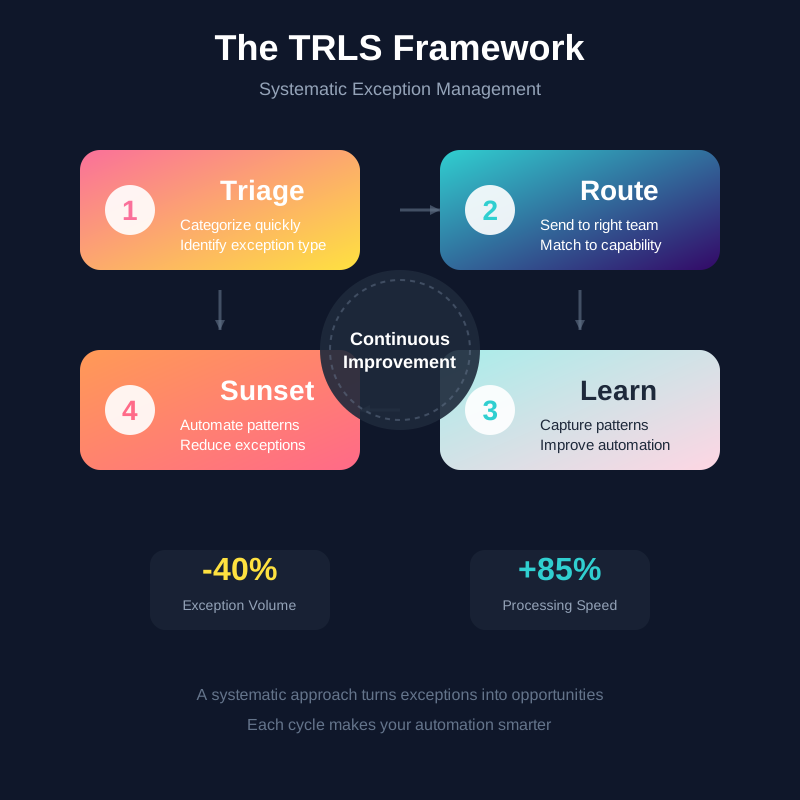
Start with triage. The moment a document lands in your exception queue, you need to quickly categorize it. Is this recoverable, meaning your AI got most of the way there? Is it an edge case following a pattern you haven't automated yet? Or is it a genuine anomaly that just needs human processing? This categorization should take seconds, not minutes. You're not solving the problem at this stage. You're just figuring out what kind of problem it is so you know how to handle it.
Good triage often comes down to having clear indicators. If your AI extracted data but flagged fields as low confidence, that's probably recoverable. If you're seeing multiple documents from the same source failing in the same way, that's an edge case worth addressing. If it's something completely random that you've never seen before and probably won't see again, that's an anomaly. Train your team to recognize these patterns quickly. Build interfaces that surface the information needed to make these decisions. Make triage fast because it's the gateway to everything else.
Once you've triaged an exception, route it appropriately. Recoverable exceptions should go to a quick review queue where people can validate and approve in bulk. Edge cases should go to someone who can analyze the pattern and determine whether it's worth creating rules or retraining models. Anomalies can go to standard manual processing. The key is that routing should be automatic based on your triage decision. You don't want people having to remember where to send things or making routing decisions on the fly.
Different exception types need different skills and different amounts of time. The person who's great at quickly reviewing and approving recoverable exceptions might not be the right person to analyze edge case patterns and propose automation solutions. Similarly, you don't want your most technically skilled person spending their day on routine exception review when they could be improving your models. Good routing matches work to capability and makes sure high-value activities (like learning from patterns) get priority.
The learning step is where most organizations fall short, but it's also where the real value gets created. Every exception is telling you something about where your automation could improve. Maybe your document classification needs better training data. Maybe you need to add a new vendor template. Maybe there's a data field you're not capturing that you should be. But you won't learn any of this if you just process exceptions and move on.
Make learning systematic. Keep a log of exception types and frequencies. Review patterns weekly or monthly. When you see the same issue repeatedly, treat it as a project to fix rather than a fact of life to accept. This doesn't mean you try to automate everything. Sometimes the right answer is that manual processing is the most efficient approach for certain document types. But make that a conscious decision based on data, not a default because you haven't looked at what's causing exceptions.
The final step is sunset, meaning you gradually reduce the types of documents that end up as exceptions in the first place. This happens naturally as you learn from patterns and improve your automation. That vendor format that was causing problems? You created a template for it, and now those documents auto-process. That ambiguous date field? You added validation rules, and now the system handles it confidently. Those low-quality scans? You worked with the source to improve their scanning process.
Sunset isn't about reaching 100% automation. It's about progressively moving common exception patterns into your standard processing. Your goal should be that your exception queue stays roughly the same size over time, even as your document volume grows. That means you're successfully automating yesterday's exceptions even as new ones emerge. If your exception queue keeps growing, you're not learning fast enough. If it's shrinking to nearly zero, you might be automating things that aren't worth the effort.
Real-World Exception Scenarios
Let me walk you through some actual situations that show how this framework plays out in practice. These are the kinds of problems that every document automation implementation faces, stripped of the corporate jargon and presented as they actually happen on a random Tuesday afternoon.
Someone in your operations team gets an email with a subject line that says "URGENT - need this processed today." Attached is a photo taken on someone's phone of a document sitting on a desk. The angle is wrong. The lighting creates shadows across half the text. There's a coffee cup visible in the corner of the image. Your document automation system takes one look at this and immediately flags it as an exception because the image quality is below threshold.
This is a genuine anomaly. No amount of AI training is going to reliably extract data from a photo taken at a 45-degree angle with bad lighting. Your triage process should recognize this immediately. The document gets routed to manual processing. Someone types in the data by hand (after probably asking for a better scan). Done and move on. But here's the learning opportunity. Why did someone send a phone photo instead of a proper scan? Maybe they don't have access to a scanner. Maybe they don't know the proper submission process. Maybe your intake procedure is too complicated. The document itself might be an anomaly, but the underlying issue might be fixable.
Here's a different scenario. You have a vendor you've worked with for three years. You get 200 invoices a month from them, and your system handles them perfectly. Then one month, nothing processes correctly. Everything lands in exceptions. You pull up one of the invoices and immediately see the problem. The vendor redesigned their invoice template. All the fields moved. The logo changed. The layout is completely different. Your AI doesn't recognize it as being from this vendor at all.
This is a textbook edge case. You're going to see this new format 200 times a month going forward. It's absolutely worth the effort to handle it properly. Triage categorizes it correctly. It gets routed to someone who can analyze the new template, create mapping rules, and possibly retrain the classification model to recognize the new format. They process this batch manually while they're setting up the automation. Within a few days, the new format is handled automatically. Crisis averted, and you've actually improved your system.
Now consider this situation. You acquire another company. Overnight, you inherit their entire vendor ecosystem. That's 50 new vendors, each with their own document formats. Your automation system has never seen any of these documents before. Everything shows up as exceptions. You could process all of them manually indefinitely, but that defeats the purpose of having automation. Or you could treat this as a one-time setup project where you systematically review the new formats, identify the common patterns, create templates for high-volume vendors, and set up proper processing for each document type.
This is where the learning step becomes critical. You're not just processing exceptions. You're building knowledge into your system. You analyze the exception patterns and determine which vendors send enough volume to justify custom templates. Maybe 10 vendors account for 80% of the document volume, so you focus there first. The remaining 40 vendors each send a few documents a month, so manual processing with good documentation might be the right answer. You make these decisions deliberately based on actual data about volume and variability, not gut feeling about what should be automated.
One more scenario that's increasingly common. You're processing loan applications. Your AI has been trained on thousands of pay stubs and can extract employment and income information with high accuracy. Then you get an application from someone who's self-employed. They don't have pay stubs. They have profit and loss statements from their business, tax returns, bank statements, and a letter from their accountant. None of these documents match the templates your system knows.
This is recoverable in the sense that all the information you need is there, but it's organized completely differently than what your system expects. The smart approach is having a workflow that recognizes self-employed applicants early in the process and routes them to specialized handling. You might have a separate model trained on business financial documents. You might have staff who specialize in evaluating self-employed applications. The key is that recognizing the pattern (self-employed applicant) triggers a different process, rather than forcing these applications through a system designed for W-2 employees and watching them fail.
Building an Exception Handling System That Actually Works
The difference between exception handling that frustrates everyone and exception handling that makes your automation genuinely useful comes down to treating it as a real system with proper design and ongoing attention. You can't just have a queue that someone checks occasionally and expect good results.
Start by assigning clear ownership. Someone needs to be responsible for exception handling as a core part of their job, not as extra work they do when they have spare time. This doesn't necessarily mean they personally process every exception. It means they own the system, monitor the queue, make sure things don't get stuck, and drive continuous improvement. Without ownership, exception handling becomes everyone's problem, which means it's nobody's problem until something breaks.
Build proper tooling around exception handling. Your exception review interface should be fast and focused. When someone pulls up an exception, they need to see the source document, the data your AI extracted, what the confidence scores were, and any relevant context that helps them make a decision. They need to be able to approve, correct, or escalate with a single click. They need to see how many exceptions are in the queue and how long each has been waiting. Good tooling makes exception handling something people can do efficiently rather than a frustrating experience that kills productivity.
Set realistic SLAs based on exception type and business priority. Maybe recoverable exceptions need review within four hours. Edge cases should be analyzed within two days to determine if they warrant automation work. Anomalies might have different SLAs depending on the document's business impact. The specific numbers matter less than having explicit expectations so people know when exception handling is falling behind and needs attention.
Create feedback mechanisms that capture what you're learning from exceptions. This doesn't need to be complicated. It could be as simple as a shared document where people note patterns they're seeing or a weekly meeting where the exception handling team discusses recurring issues. The point is making sure that insights from exception handling flow back to the people who can improve the automation. Your AI engineers need to know that vendor invoices from the Northeast region keep failing because of date format variations. Your business process owners need to know that a specific form confuses applicants who then fill it out incorrectly. This feedback loop is how your system gets better.
Build escalation paths for situations that need urgent attention. Most exceptions can wait a few hours or even a day for processing. Some can't. If your exception handling process doesn't distinguish between routine problems and critical issues, you'll either over-respond to everything (and burn people out) or under-respond to genuinely urgent situations (and create business problems). Clear escalation criteria help people make good decisions about what needs immediate attention versus what can be handled in normal queue order.
Think about exception handling capacity as part of your overall resource planning. If you process 10,000 documents a month and 5% are exceptions, that's 500 documents that need human attention. If each exception takes an average of five minutes to handle (some take 30 seconds, some take 20 minutes), that's about 42 hours of work per month. You need to staff for that workload, or you need to accept longer processing times. Most organizations underestimate exception handling effort because they focus on the automation success rate and forget that the remaining percentage still represents real work.
Consider building or buying specialized tools for different exception types. Recoverable exceptions might benefit from a rapid review interface with bulk approval capabilities. Edge case analysis might need tools for comparing document variations side by side and testing new templates. Anomaly processing might need better integration with your manual workflows so data doesn't have to be entered twice. The specific tools depend on your situation, but the principle is that exception handling deserves proper tooling, not just using whatever basic interface came with your automation platform.
Moving Forward
If you're running document automation and you're frustrated with exceptions, you're not alone. Every organization deals with this. The difference between success and failure isn't eliminating exceptions (you won't). It's building a system that handles them efficiently and learns from them systematically.
Start by auditing your current exception situation. How many exceptions do you really have? What types are they? How long do they sit in the queue? Who handles them and how consistently? You need baseline data before you can improve. Spend a week tracking every exception that comes through. Categorize them. Time them. Note patterns. This audit often reveals that your exception situation isn't as bad as it feels, or it identifies specific problem areas you can tackle.
Pick one exception pattern that happens frequently and fix it properly. Don't try to solve everything at once. Choose something manageable, like a specific vendor whose documents keep failing, or a particular field that your AI struggles with. Treat it as a project with a clear goal. Solve that one problem completely. Document what you did and how it worked. Then move to the next pattern. Building capability through small wins works better than trying to overhaul your entire exception handling approach at once.
Get your team involved in improving exception handling. The people who process exceptions every day have insights about what's not working and ideas about what might help. They see patterns before those patterns show up in reports. They know which exceptions are genuinely hard and which ones just have clunky workflows. Create regular opportunities for them to share what they're seeing and suggest improvements. Exception handling gets better when the people doing the work feel ownership over making it better.
Accept that some level of exceptions is normal and even healthy. A system that requires zero human intervention isn't flexible enough to handle the real world. The goal isn't perfect automation. The goal is automation that handles the predictable stuff efficiently while routing the unpredictable stuff to people who can deal with it effectively. Finding that balance, and continuously adjusting it as your business changes, is what makes document automation actually work in practice rather than just in demos.
Your automation project doesn't succeed or fail based on whether you reach 95% or 97% or 99% automated processing. It succeeds based on whether your overall process (automation plus exception handling) is faster, more accurate, and less frustrating than what you had before. A system that auto-processes 95% of documents and handles the other 5% smoothly is infinitely better than one that auto-processes 98% but makes the remaining 2% painful and slow.
The exception queue isn't a sign that your automation failed. It's a feature of any system dealing with real-world variability. The question is whether you're managing it well. That management makes the difference between document automation that delivers real value and document automation that just shifts work around without actually making things better. Get exception handling right, and everything else falls into place.